
Burst. AI Prompting Techniques
Self-initiated · Role: AI Product Designer · Date: 2026

BUILT IN
1 day + polish
STACK
Lovable · Claude API · Supabase
STATUS
Live MVP
Problem Statement
Prompting without strategy is like designing without a system. You might get somewhere, but it takes much longer and the results are less predictable.
That's exactly what happened to me when I started using AI in my workflow. I wrote prompts by intuition, sometimes it worked, sometimes it didn't. Until I discovered that there are specific techniques, like Zero-Shot, Few-Shot, Chain-of-Thought or RTCCF, that completely change the quality of the output.
The Challenge
Most designers and creatives starting with AI have no framework for prompting. They rely on intuition, get inconsistent results, and don't know why.
How might we help designers and creatives move from intuitive prompting to intentional prompting?
The Spark → From idea to build.
Burst was born at the SheBuilds workshop in Barcelona on International Women's Day 2026, a day dedicated to building. I didn't arrive with a finished idea. I arrived with a problem I'd been living myself and a few hours to turn it into something real.
The process wasn't traditional. There were no wireframes, no lo-fi sketches. Instead, the first design artifact was the prompt itself, a detailed brief I wrote for Lovable describing the product, the UX logic, the visual language, and the technical stack. That prompt was my spec.
From there I built iteratively, making product decisions in real time: what to prioritize, what to leave for later, what the MVP needed to do to be genuinely useful. I started at the workshop and polished it at home that same day.

Initial Prompt
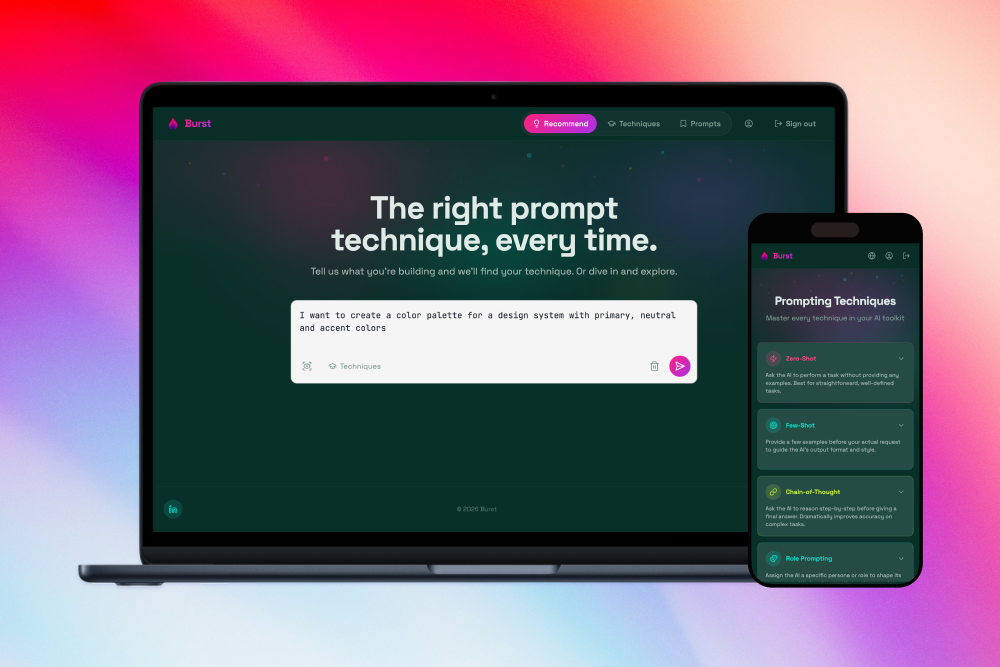
Create a web app called Burst, a prompting techniques guide for designers and creatives learning AI. The app is responsive (desktop + mobile). The initial language is English, but the architecture must be prepared for multilanguage support using i18next, as more languages will be added later.
Core feature: A text input where the user describes what they want to do with AI → the app uses the Claude API to analyze their intent and recommend the best prompting technique (zero-shot, few-shot, chain-of-thought, etc.) with an explanation and a ready-to-copy example prompt. The user can type their description or dictate it using the Web Speech API.
Secondary section: A visual explorer of all prompting techniques as cards, name, when to use it, and an example.
Future section (do not build now, but consider in the architecture): A guide to the AI tools ecosystem (Lovable, Cursor, v0, Antigravity…) with their available models, credit systems, and recommendations on when to use each one depending on the task.
Logo: Create a typographic logo for "Burst" with a symbol evoking magic, sparks or an explosion of energy, like a spark, a flame, a flash or a bursting star. The style should be minimalist and elegant, coherent with the overall app design. In fuchsia or with a fuchsia/white gradient.
Design: Dark mode only. Minimalist and elegant with a touch of magic. Color palette: background #0a2e2e, main accent color fuchsia #ff1f8e, secondary accents cyan #00e5d4 or lime green #c6f135 for hover states and details. Use Tailwind CSS and shadcn/ui for components, Lucide for icons. Clean typography, high contrast. Content cards (with prompt examples) should have a light background with dark text for readability. The overall aesthetic should evoke a premium developer tool, think Linear or Vercel.
Product decisions
Every feature in Burst was a deliberate choice, not a default.
🔀 Double entry point: The home offers two ways in: describe what you want to do and get a recommendation, or explore all techniques directly. The default is the recommendation flow . The one that adds the most value, but the explorer is always one click away for users who prefer to browse first.
🌗 Light cards on dark background: The overall aesthetic is dark mode, but prompt examples live in light-background cards. A deliberate contrast decision: when you're reading and copying technical content, dark text on white is easier on the eye than reversed text. Form follows function.
🎤 Voice input: Typing a prompt description felt like extra friction. Adding voice input via the Web Speech API removes that barrier, especially on mobile, where Burst shines as a reference tool while you work.
🔍 OCR: Scan images with text If you have a screenshot of a prompt, a photo of a whiteboard, or someone else's technique shared as an image, you can upload it and Burst will extract the text. A small feature with high utility for the target user.
💾 Saved prompts per user: Burst isn't just a guide, it's a workspace. Each user has their own library of saved prompts, tagged by technique, ready to reuse. This required authentication and a real database, making Burst a product rather than a prototype.
🌍 Multilanguage support: Built with i18next from day one, with English as the default. Spanish already available. More languages to come without touching the architecture.


Under the Hood
Burst is a full-stack web app built entirely through vibe coding, no manual code written. Here's what's running under the surface:
⚡ Lovable: AI-powered development platform used to build and deploy the entire app through natural language prompts.
🧠 Claude API (Anthropic): Powers the core recommendation engine. Analyzes the user's input and returns the most suitable prompting technique with explanation and example.
🗄️ Supabase: Handles the database and authentication. Each user has their own account and saved prompt library stored in PostgreSQL.
🎨 Shadcn/ui + Tailwind CSS: Component library and styling. shadcn provided the functional base components, customized to match Burst's dark, high-contrast visual language.
🖼️ Lucide: Icon library, consistent and lightweight.
🗣️ Web Speech API: Native browser API for voice input. No external service, no added cost.
👁️ OCR: Image scanning to extract text from uploaded images.
🌐 i18next: Internationalization library managing multilanguage support from day one.
Testimonials
"I've been using Burst every day this week. I just tell it what I want to do and it gives me the prompt ready to use, I don't need to think about which technique applies. And saving the ones that worked has been a game changer. I've also started learning the techniques just by seeing them in the guide, without it feeling like studying."
— Silvana O. (Product Designer. Barcelona)
She also shared Burst with two of her clients (non-technical entrepreneurs) as a friendly resource to help them use AI in their businesses. Organic reach from day one.
Impacto
🔥Built and shipped in one day
From idea to live product in a single workshop day.
💬 Real users, real feedback
Launched publicly on LinkedIn and shared at SheBuilds Barcelona. First users testing and responding.
🧠 A tool that fills a real gap
No existing tool helps creatives choose the right prompting technique based on their goal. Burst does.
Next Steps
The MVP validates the core concept. These are the next iterations on the roadmap:
🔧 Ecosystem guide: A second section covering AI tools (Lovable, Cursor, v0, Antigravity…), their models, and how to use credits efficiently. Already planned in the architecture.
🌐 More languages: The i18next foundation is ready. Next language to add based on user demand.
🧪 User testing: Structured testing sessions with designers to validate the recommendation quality and identify friction points.
📈 Metrics: Define and track meaningful KPIs once traffic grows: recommendations generated, prompts saved, return visits.
Selected work
Burst. AI Prompting TechniquesVibe coding - AI - Productivity

Unlocking Real-Time Team PerformanceSaaS - B2B
A Door-to-Door Journey Pilot for Renfe MaaS - SaaS - B2B - Mobile

Partner Portal & Pigment: Platform + Design SystemFintech - SaaS - B2B
Humanizing the Fintech Back OfficeFintech - SaaS - B2B

Embedded Finance SeamlesslyFintech - SaaS - B2B

María Rey. Based in Barcelona, working remotely too